
A data catalog for every step of your data projects
Discover your data, define what needs to be built, visualise it, test it, and monitor data quality.
Find your data
We provide multiple solutions to help you find your data quickly.
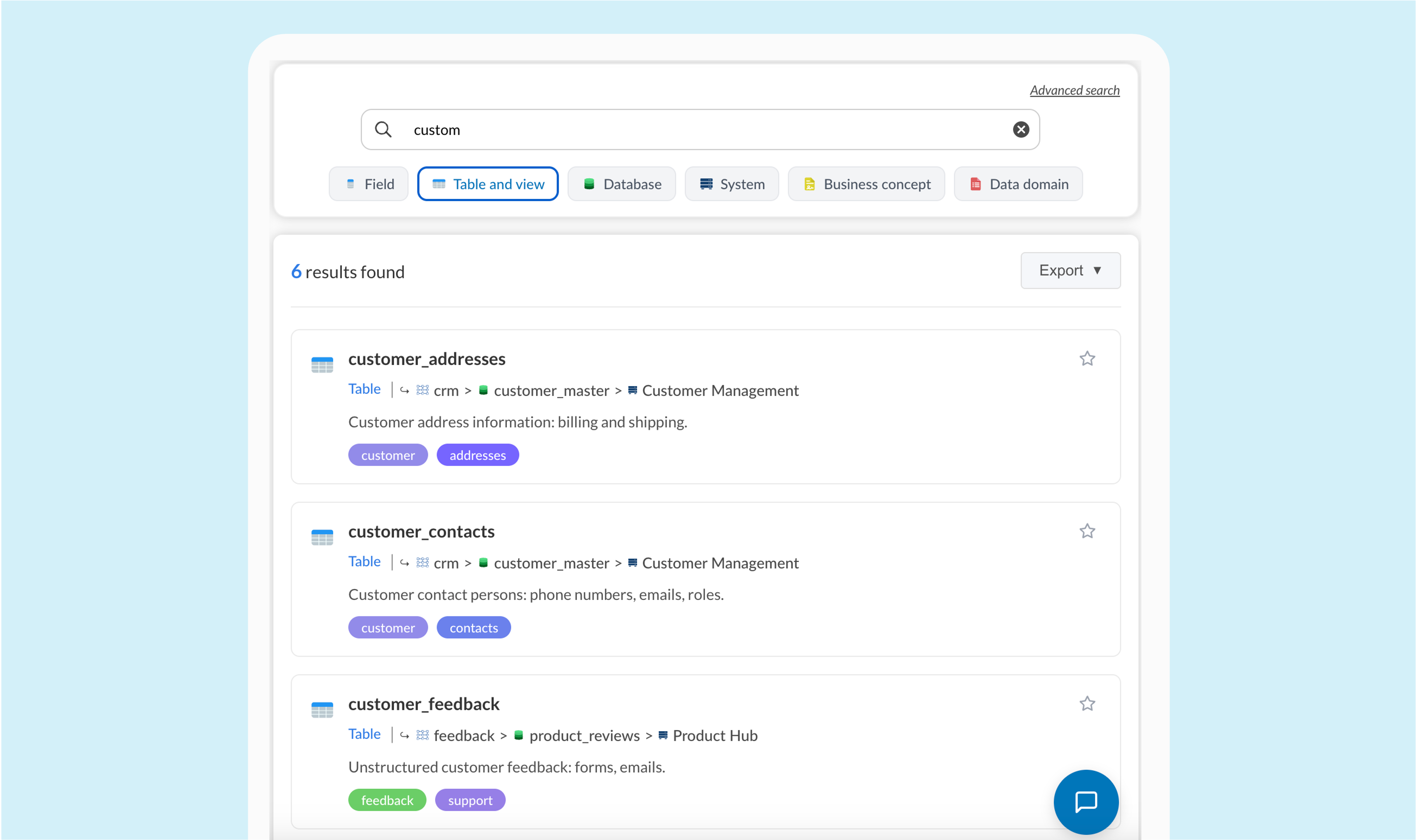
Simple search
Search your data easily with our fast and intuitive interface. Ideal for simple queries and daily usage.
SQL-like search
Use SQL-like queries for precise and advanced searches. Perfect for technical users who want to filter and analyze their data.
Most precise
AI search
Ask your questions in natural language and let our AI find the relevant data for you. A new way to interact with your data.
Smartest
Understand your data
Navigate smoothly between all your data assets, from technical to business assets, in a unified catalog.
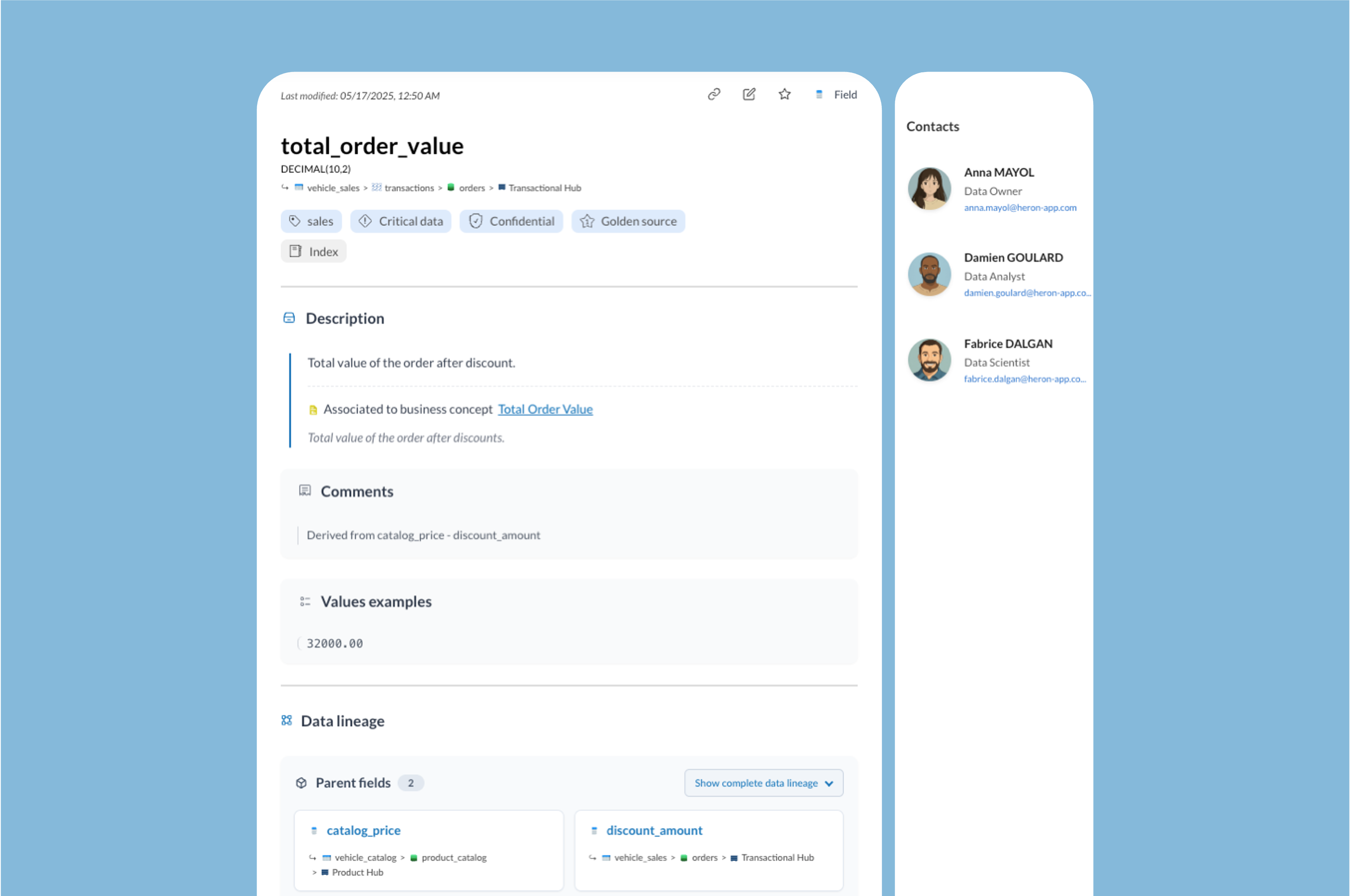
All data assets in one place
Document all your assets: description, associated dashboards and data products, data lineage, source, criticity, confidentiality, attached medias...
Technical Assets




Business Assets

Dashboards
Data Products
Connect your data stack
Depending on the platform, you can import far more than tables and columns, including semantic context, lineage, usage analytics, unstructured assets, database code and integrated workflows.
Databricks
The list of fields, tables, schemas and databases with their names and technical constraints (types, keys, nullability).
The business definition of each field, read from the SQL comment attached to it.
How data flows from one asset to another — which sources feed each table and field, and where they are reused downstream.
Usage statistics for tables and fields: how often they are queried and how heavily they are relied on.
An inventory of file-based and non-tabular assets stored in the platform (objects, files, volumes).
Code embedded in the database: functions, stored procedures, triggers, views and other code objects.
The orchestration layer: jobs, runs and scheduled pipelines defined in the platform.
Push table and column descriptions from your catalog back to the source as native SQL comments, with a full preview and side-by-side diff before writing.
Automated sync
Schedule each connection to sync automatically
Snowflake
- Technical metadata: Available. The list of fields, tables, schemas and databases with their names and technical constraints (types, keys, nullability).
- Semantic layer: Available. The business definition of each field, read from the SQL comment attached to it.
- Data lineage: Available. How data flows from one asset to another — which sources feed each table and field, and where they are reused downstream.
- Usage analytics: Available. Usage statistics for tables and fields: how often they are queried and how heavily they are relied on.
- List of unstructured data: Available. An inventory of file-based and non-tabular assets stored in the platform (objects, files, volumes).
- Database code: Available. Code embedded in the database: functions, stored procedures, triggers, views and other code objects.
- Workflows: Available. The orchestration layer: jobs, runs and scheduled pipelines defined in the platform.
- Two-way sync: Available. Push table and column descriptions from your catalog back to the source as native SQL comments, with a full preview and side-by-side diff before writing.
Databricks
- Technical metadata: Available. The list of fields, tables, schemas and databases with their names and technical constraints (types, keys, nullability).
- Semantic layer: Available. The business definition of each field, read from the SQL comment attached to it.
- Data lineage: Available. How data flows from one asset to another — which sources feed each table and field, and where they are reused downstream.
- Usage analytics: Available. Usage statistics for tables and fields: how often they are queried and how heavily they are relied on.
- List of unstructured data: Available. An inventory of file-based and non-tabular assets stored in the platform (objects, files, volumes).
- Database code: Not available. Code embedded in the database: functions, stored procedures, triggers, views and other code objects.
- Workflows: Available. The orchestration layer: jobs, runs and scheduled pipelines defined in the platform.
- Two-way sync: Available. Push table and column descriptions from your catalog back to the source as native SQL comments, with a full preview and side-by-side diff before writing.
BigQuery
- Technical metadata: Available. The list of fields, tables, schemas and databases with their names and technical constraints (types, keys, nullability).
- Semantic layer: Available. The business definition of each field, read from the SQL comment attached to it.
- Data lineage: Available. How data flows from one asset to another — which sources feed each table and field, and where they are reused downstream.
- Usage analytics: Available. Usage statistics for tables and fields: how often they are queried and how heavily they are relied on.
- List of unstructured data: Not available. An inventory of file-based and non-tabular assets stored in the platform (objects, files, volumes).
- Database code: Available. Code embedded in the database: functions, stored procedures, triggers, views and other code objects.
- Workflows: Not available. The orchestration layer: jobs, runs and scheduled pipelines defined in the platform.
- Two-way sync: Available. Push table and column descriptions from your catalog back to the source as native SQL comments, with a full preview and side-by-side diff before writing.
PostgreSQL
- Technical metadata: Available. The list of fields, tables, schemas and databases with their names and technical constraints (types, keys, nullability).
- Semantic layer: Available. The business definition of each field, read from the SQL comment attached to it.
- Data lineage: Not available. How data flows from one asset to another — which sources feed each table and field, and where they are reused downstream.
- Usage analytics: Available. Usage statistics for tables and fields: how often they are queried and how heavily they are relied on.
- List of unstructured data: Not available. An inventory of file-based and non-tabular assets stored in the platform (objects, files, volumes).
- Database code: Available. Code embedded in the database: functions, stored procedures, triggers, views and other code objects.
- Workflows: Not available. The orchestration layer: jobs, runs and scheduled pipelines defined in the platform.
- Two-way sync: Available. Push table and column descriptions from your catalog back to the source as native SQL comments, with a full preview and side-by-side diff before writing.
MySQL
- Technical metadata: Available. The list of fields, tables, schemas and databases with their names and technical constraints (types, keys, nullability).
- Semantic layer: Available. The business definition of each field, read from the SQL comment attached to it.
- Data lineage: Not available. How data flows from one asset to another — which sources feed each table and field, and where they are reused downstream.
- Usage analytics: Available. Usage statistics for tables and fields: how often they are queried and how heavily they are relied on.
- List of unstructured data: Not available. An inventory of file-based and non-tabular assets stored in the platform (objects, files, volumes).
- Database code: Available. Code embedded in the database: functions, stored procedures, triggers, views and other code objects.
- Workflows: Not available. The orchestration layer: jobs, runs and scheduled pipelines defined in the platform.
- Two-way sync: Available. Push table and column descriptions from your catalog back to the source as native SQL comments, with a full preview and side-by-side diff before writing.
Amazon Aurora
- Technical metadata: Available. The list of fields, tables, schemas and databases with their names and technical constraints (types, keys, nullability).
- Semantic layer: Available. The business definition of each field, read from the SQL comment attached to it.
- Data lineage: Not available. How data flows from one asset to another — which sources feed each table and field, and where they are reused downstream.
- Usage analytics: Available. Usage statistics for tables and fields: how often they are queried and how heavily they are relied on.
- List of unstructured data: Not available. An inventory of file-based and non-tabular assets stored in the platform (objects, files, volumes).
- Database code: Available. Code embedded in the database: functions, stored procedures, triggers, views and other code objects.
- Workflows: Not available. The orchestration layer: jobs, runs and scheduled pipelines defined in the platform.
- Two-way sync: Not available. Push table and column descriptions from your catalog back to the source as native SQL comments, with a full preview and side-by-side diff before writing.
SQL Server
- Technical metadata: Available. The list of fields, tables, schemas and databases with their names and technical constraints (types, keys, nullability).
- Semantic layer: Available. The business definition of each field, read from the SQL comment attached to it.
- Data lineage: Not available. How data flows from one asset to another — which sources feed each table and field, and where they are reused downstream.
- Usage analytics: Available. Usage statistics for tables and fields: how often they are queried and how heavily they are relied on.
- List of unstructured data: Not available. An inventory of file-based and non-tabular assets stored in the platform (objects, files, volumes).
- Database code: Available. Code embedded in the database: functions, stored procedures, triggers, views and other code objects.
- Workflows: Not available. The orchestration layer: jobs, runs and scheduled pipelines defined in the platform.
- Two-way sync: Available. Push table and column descriptions from your catalog back to the source as native SQL comments, with a full preview and side-by-side diff before writing.
Oracle
- Technical metadata: Available. The list of fields, tables, schemas and databases with their names and technical constraints (types, keys, nullability).
- Semantic layer: Available. The business definition of each field, read from the SQL comment attached to it.
- Data lineage: Not available. How data flows from one asset to another — which sources feed each table and field, and where they are reused downstream.
- Usage analytics: Available. Usage statistics for tables and fields: how often they are queried and how heavily they are relied on.
- List of unstructured data: Not available. An inventory of file-based and non-tabular assets stored in the platform (objects, files, volumes).
- Database code: Available. Code embedded in the database: functions, stored procedures, triggers, views and other code objects.
- Workflows: Not available. The orchestration layer: jobs, runs and scheduled pipelines defined in the platform.
- Two-way sync: Available. Push table and column descriptions from your catalog back to the source as native SQL comments, with a full preview and side-by-side diff before writing.
SAP HANA
- Technical metadata: Available. The list of fields, tables, schemas and databases with their names and technical constraints (types, keys, nullability).
- Semantic layer: Available. The business definition of each field, read from the SQL comment attached to it.
- Data lineage: Not available. How data flows from one asset to another — which sources feed each table and field, and where they are reused downstream.
- Usage analytics: Available. Usage statistics for tables and fields: how often they are queried and how heavily they are relied on.
- List of unstructured data: Not available. An inventory of file-based and non-tabular assets stored in the platform (objects, files, volumes).
- Database code: Available. Code embedded in the database: functions, stored procedures, triggers, views and other code objects.
- Workflows: Not available. The orchestration layer: jobs, runs and scheduled pipelines defined in the platform.
- Two-way sync: Not available. Push table and column descriptions from your catalog back to the source as native SQL comments, with a full preview and side-by-side diff before writing.
ClickHouse
- Technical metadata: Available. The list of fields, tables, schemas and databases with their names and technical constraints (types, keys, nullability).
- Semantic layer: Available. The business definition of each field, read from the SQL comment attached to it.
- Data lineage: Not available. How data flows from one asset to another — which sources feed each table and field, and where they are reused downstream.
- Usage analytics: Available. Usage statistics for tables and fields: how often they are queried and how heavily they are relied on.
- List of unstructured data: Not available. An inventory of file-based and non-tabular assets stored in the platform (objects, files, volumes).
- Database code: Not available. Code embedded in the database: functions, stored procedures, triggers, views and other code objects.
- Workflows: Not available. The orchestration layer: jobs, runs and scheduled pipelines defined in the platform.
- Two-way sync: Not available. Push table and column descriptions from your catalog back to the source as native SQL comments, with a full preview and side-by-side diff before writing.
Redshift
- Technical metadata: Available. The list of fields, tables, schemas and databases with their names and technical constraints (types, keys, nullability).
- Semantic layer: Available. The business definition of each field, read from the SQL comment attached to it.
- Data lineage: Not available. How data flows from one asset to another — which sources feed each table and field, and where they are reused downstream.
- Usage analytics: Available. Usage statistics for tables and fields: how often they are queried and how heavily they are relied on.
- List of unstructured data: Not available. An inventory of file-based and non-tabular assets stored in the platform (objects, files, volumes).
- Database code: Available. Code embedded in the database: functions, stored procedures, triggers, views and other code objects.
- Workflows: Not available. The orchestration layer: jobs, runs and scheduled pipelines defined in the platform.
- Two-way sync: Available. Push table and column descriptions from your catalog back to the source as native SQL comments, with a full preview and side-by-side diff before writing.
Azure Synapse
- Technical metadata: Available. The list of fields, tables, schemas and databases with their names and technical constraints (types, keys, nullability).
- Semantic layer: Available. The business definition of each field, read from the SQL comment attached to it.
- Data lineage: Not available. How data flows from one asset to another — which sources feed each table and field, and where they are reused downstream.
- Usage analytics: Available. Usage statistics for tables and fields: how often they are queried and how heavily they are relied on.
- List of unstructured data: Not available. An inventory of file-based and non-tabular assets stored in the platform (objects, files, volumes).
- Database code: Available. Code embedded in the database: functions, stored procedures, triggers, views and other code objects.
- Workflows: Not available. The orchestration layer: jobs, runs and scheduled pipelines defined in the platform.
- Two-way sync: Available. Push table and column descriptions from your catalog back to the source as native SQL comments, with a full preview and side-by-side diff before writing.
MariaDB
- Technical metadata: Available. The list of fields, tables, schemas and databases with their names and technical constraints (types, keys, nullability).
- Semantic layer: Available. The business definition of each field, read from the SQL comment attached to it.
- Data lineage: Not available. How data flows from one asset to another — which sources feed each table and field, and where they are reused downstream.
- Usage analytics: Available. Usage statistics for tables and fields: how often they are queried and how heavily they are relied on.
- List of unstructured data: Not available. An inventory of file-based and non-tabular assets stored in the platform (objects, files, volumes).
- Database code: Available. Code embedded in the database: functions, stored procedures, triggers, views and other code objects.
- Workflows: Not available. The orchestration layer: jobs, runs and scheduled pipelines defined in the platform.
- Two-way sync: Available. Push table and column descriptions from your catalog back to the source as native SQL comments, with a full preview and side-by-side diff before writing.
Azure SQL
- Technical metadata: Available. The list of fields, tables, schemas and databases with their names and technical constraints (types, keys, nullability).
- Semantic layer: Available. The business definition of each field, read from the SQL comment attached to it.
- Data lineage: Not available. How data flows from one asset to another — which sources feed each table and field, and where they are reused downstream.
- Usage analytics: Available. Usage statistics for tables and fields: how often they are queried and how heavily they are relied on.
- List of unstructured data: Not available. An inventory of file-based and non-tabular assets stored in the platform (objects, files, volumes).
- Database code: Available. Code embedded in the database: functions, stored procedures, triggers, views and other code objects.
- Workflows: Not available. The orchestration layer: jobs, runs and scheduled pipelines defined in the platform.
- Two-way sync: Available. Push table and column descriptions from your catalog back to the source as native SQL comments, with a full preview and side-by-side diff before writing.
dbt Core
- Technical metadata: Available. The list of fields, tables, schemas and databases with their names and technical constraints (types, keys, nullability).
- Semantic layer: Available. The business definition of each field, read from the SQL comment attached to it.
- Data lineage: Available. How data flows from one asset to another — which sources feed each table and field, and where they are reused downstream.
- Usage analytics: Not available. Usage statistics for tables and fields: how often they are queried and how heavily they are relied on.
- List of unstructured data: Not available. An inventory of file-based and non-tabular assets stored in the platform (objects, files, volumes).
- Database code: Not available. Code embedded in the database: functions, stored procedures, triggers, views and other code objects.
- Workflows: Not available. The orchestration layer: jobs, runs and scheduled pipelines defined in the platform.
- Two-way sync: Not available. Push table and column descriptions from your catalog back to the source as native SQL comments, with a full preview and side-by-side diff before writing.
Google Cloud Storage
- Technical metadata: Not available. The list of fields, tables, schemas and databases with their names and technical constraints (types, keys, nullability).
- Semantic layer: Not available. The business definition of each field, read from the SQL comment attached to it.
- Data lineage: Not available. How data flows from one asset to another — which sources feed each table and field, and where they are reused downstream.
- Usage analytics: Not available. Usage statistics for tables and fields: how often they are queried and how heavily they are relied on.
- List of unstructured data: Available. An inventory of file-based and non-tabular assets stored in the platform (objects, files, volumes).
- Database code: Not available. Code embedded in the database: functions, stored procedures, triggers, views and other code objects.
- Workflows: Not available. The orchestration layer: jobs, runs and scheduled pipelines defined in the platform.
- Two-way sync: Not available. Push table and column descriptions from your catalog back to the source as native SQL comments, with a full preview and side-by-side diff before writing.
Amazon S3
- Technical metadata: Not available. The list of fields, tables, schemas and databases with their names and technical constraints (types, keys, nullability).
- Semantic layer: Not available. The business definition of each field, read from the SQL comment attached to it.
- Data lineage: Not available. How data flows from one asset to another — which sources feed each table and field, and where they are reused downstream.
- Usage analytics: Not available. Usage statistics for tables and fields: how often they are queried and how heavily they are relied on.
- List of unstructured data: Available. An inventory of file-based and non-tabular assets stored in the platform (objects, files, volumes).
- Database code: Not available. Code embedded in the database: functions, stored procedures, triggers, views and other code objects.
- Workflows: Not available. The orchestration layer: jobs, runs and scheduled pipelines defined in the platform.
- Two-way sync: Not available. Push table and column descriptions from your catalog back to the source as native SQL comments, with a full preview and side-by-side diff before writing.
Azure Data Lake Storage
- Technical metadata: Not available. The list of fields, tables, schemas and databases with their names and technical constraints (types, keys, nullability).
- Semantic layer: Not available. The business definition of each field, read from the SQL comment attached to it.
- Data lineage: Not available. How data flows from one asset to another — which sources feed each table and field, and where they are reused downstream.
- Usage analytics: Not available. Usage statistics for tables and fields: how often they are queried and how heavily they are relied on.
- List of unstructured data: Available. An inventory of file-based and non-tabular assets stored in the platform (objects, files, volumes).
- Database code: Not available. Code embedded in the database: functions, stored procedures, triggers, views and other code objects.
- Workflows: Not available. The orchestration layer: jobs, runs and scheduled pipelines defined in the platform.
- Two-way sync: Not available. Push table and column descriptions from your catalog back to the source as native SQL comments, with a full preview and side-by-side diff before writing.
Microsoft OneLake
- Technical metadata: Not available. The list of fields, tables, schemas and databases with their names and technical constraints (types, keys, nullability).
- Semantic layer: Not available. The business definition of each field, read from the SQL comment attached to it.
- Data lineage: Not available. How data flows from one asset to another — which sources feed each table and field, and where they are reused downstream.
- Usage analytics: Not available. Usage statistics for tables and fields: how often they are queried and how heavily they are relied on.
- List of unstructured data: Available. An inventory of file-based and non-tabular assets stored in the platform (objects, files, volumes).
- Database code: Not available. Code embedded in the database: functions, stored procedures, triggers, views and other code objects.
- Workflows: Not available. The orchestration layer: jobs, runs and scheduled pipelines defined in the platform.
- Two-way sync: Not available. Push table and column descriptions from your catalog back to the source as native SQL comments, with a full preview and side-by-side diff before writing.
Teradata
- Technical metadata: Available. The list of fields, tables, schemas and databases with their names and technical constraints (types, keys, nullability).
- Semantic layer: Available. The business definition of each field, read from the SQL comment attached to it.
- Data lineage: Not available. How data flows from one asset to another — which sources feed each table and field, and where they are reused downstream.
- Usage analytics: Not available. Usage statistics for tables and fields: how often they are queried and how heavily they are relied on.
- List of unstructured data: Not available. An inventory of file-based and non-tabular assets stored in the platform (objects, files, volumes).
- Database code: Available. Code embedded in the database: functions, stored procedures, triggers, views and other code objects.
- Workflows: Not available. The orchestration layer: jobs, runs and scheduled pipelines defined in the platform.
- Two-way sync: Not available. Push table and column descriptions from your catalog back to the source as native SQL comments, with a full preview and side-by-side diff before writing.
Vertica
- Technical metadata: Available. The list of fields, tables, schemas and databases with their names and technical constraints (types, keys, nullability).
- Semantic layer: Available. The business definition of each field, read from the SQL comment attached to it.
- Data lineage: Not available. How data flows from one asset to another — which sources feed each table and field, and where they are reused downstream.
- Usage analytics: Available. Usage statistics for tables and fields: how often they are queried and how heavily they are relied on.
- List of unstructured data: Not available. An inventory of file-based and non-tabular assets stored in the platform (objects, files, volumes).
- Database code: Available. Code embedded in the database: functions, stored procedures, triggers, views and other code objects.
- Workflows: Not available. The orchestration layer: jobs, runs and scheduled pipelines defined in the platform.
- Two-way sync: Not available. Push table and column descriptions from your catalog back to the source as native SQL comments, with a full preview and side-by-side diff before writing.
IBM Db2
- Technical metadata: Available. The list of fields, tables, schemas and databases with their names and technical constraints (types, keys, nullability).
- Semantic layer: Available. The business definition of each field, read from the SQL comment attached to it.
- Data lineage: Not available. How data flows from one asset to another — which sources feed each table and field, and where they are reused downstream.
- Usage analytics: Available. Usage statistics for tables and fields: how often they are queried and how heavily they are relied on.
- List of unstructured data: Not available. An inventory of file-based and non-tabular assets stored in the platform (objects, files, volumes).
- Database code: Available. Code embedded in the database: functions, stored procedures, triggers, views and other code objects.
- Workflows: Not available. The orchestration layer: jobs, runs and scheduled pipelines defined in the platform.
- Two-way sync: Not available. Push table and column descriptions from your catalog back to the source as native SQL comments, with a full preview and side-by-side diff before writing.
IBM AS/400
- Technical metadata: Available. The list of fields, tables, schemas and databases with their names and technical constraints (types, keys, nullability).
- Semantic layer: Available. The business definition of each field, read from the SQL comment attached to it.
- Data lineage: Not available. How data flows from one asset to another — which sources feed each table and field, and where they are reused downstream.
- Usage analytics: Not available. Usage statistics for tables and fields: how often they are queried and how heavily they are relied on.
- List of unstructured data: Not available. An inventory of file-based and non-tabular assets stored in the platform (objects, files, volumes).
- Database code: Not available. Code embedded in the database: functions, stored procedures, triggers, views and other code objects.
- Workflows: Not available. The orchestration layer: jobs, runs and scheduled pipelines defined in the platform.
- Two-way sync: Not available. Push table and column descriptions from your catalog back to the source as native SQL comments, with a full preview and side-by-side diff before writing.
Power BI
- Reports & dashboards: Available. The inventory of reports, workbooks, pages, views and dashboards published on the platform.
- Semantic model: Limited. The datasets, models or query definitions behind reports, plus measures and calculated fields.
- Source connections: Available. Which databases and data sources a report or dashboard connects to.
- Field lineage: Limited. Field references extracted from metadata APIs or query parsing, and matched back to catalog fields.
- Consumption analytics: Not available. Report or view usage metadata, such as opening frequency or view counts.
Tableau
- Reports & dashboards: Available. The inventory of reports, workbooks, pages, views and dashboards published on the platform.
- Semantic model: Limited. The datasets, models or query definitions behind reports, plus measures and calculated fields.
- Source connections: Available. Which databases and data sources a report or dashboard connects to.
- Field lineage: Limited. Field references extracted from metadata APIs or query parsing, and matched back to catalog fields.
- Consumption analytics: Limited. Report or view usage metadata, such as opening frequency or view counts.
Looker
- Reports & dashboards: Available. The inventory of reports, workbooks, pages, views and dashboards published on the platform.
- Semantic model: Limited. The datasets, models or query definitions behind reports, plus measures and calculated fields.
- Source connections: Not available. Which databases and data sources a report or dashboard connects to.
- Field lineage: Limited. Field references extracted from metadata APIs or query parsing, and matched back to catalog fields.
- Consumption analytics: Not available. Report or view usage metadata, such as opening frequency or view counts.
Qlik Sense
- Reports & dashboards: Available. The inventory of reports, workbooks, pages, views and dashboards published on the platform.
- Semantic model: Available. The datasets, models or query definitions behind reports, plus measures and calculated fields.
- Source connections: Available. Which databases and data sources a report or dashboard connects to.
- Field lineage: Limited. Field references extracted from metadata APIs or query parsing, and matched back to catalog fields.
- Consumption analytics: Not available. Report or view usage metadata, such as opening frequency or view counts.
Grafana
- Reports & dashboards: Available. The inventory of reports, workbooks, pages, views and dashboards published on the platform.
- Semantic model: Limited. The datasets, models or query definitions behind reports, plus measures and calculated fields.
- Source connections: Available. Which databases and data sources a report or dashboard connects to.
- Field lineage: Limited. Field references extracted from metadata APIs or query parsing, and matched back to catalog fields.
- Consumption analytics: Not available. Report or view usage metadata, such as opening frequency or view counts.
Metabase
- Reports & dashboards: Available. The inventory of reports, workbooks, pages, views and dashboards published on the platform.
- Semantic model: Limited. The datasets, models or query definitions behind reports, plus measures and calculated fields.
- Source connections: Available. Which databases and data sources a report or dashboard connects to.
- Field lineage: Limited. Field references extracted from metadata APIs or query parsing, and matched back to catalog fields.
- Consumption analytics: Not available. Report or view usage metadata, such as opening frequency or view counts.
Trace the lineage of your data
Follow every transformation of your data, from source systems to reports, on an interactive canvas, and even design future pipelines on it.
Origins and transformations
Understand where each table comes from and what transformation is applied at every step: union, join, aggregation, exact copy.
Field and table level
Drill from table flows down to individual columns. Each field keeps its own lineage.
Up and down navigation
Climb up to the source systems or down to the dashboards.
The same canvas is a collaborative board: sketch future pipelines and enrich your catalog before development even starts.
Let AI do the tedious work
Let our AI analyze your metadata and generate lineage, business concepts, and more, in just a few clicks.
Track data quality
Bring your quality checks into your data catalog, by connecting it to your databases.
- customers48,210 rows
- iduuid8f3a…c21e
- emailvarcharana@acme.io
- countryvarcharFR
- orders312,480 rows
- order_iduuid51b7…09ad
- amountdecimal129.90
- created_attimestamp2026-09-24 09:30
Refresh your existing check results on schedule or on demand.
Explore data qualityTalk to your data with AI
Need a specific piece of information? Ask the AI assistant built into the data catalog.
Natural language questions
Ask your questions in plain language, without writing a query or knowing the technical model.
Contextual recommendations
Get recommendations based on what is documented in your catalog.
How can I help you today?
Give your AI agents a context layer
Connect your AI agents to your data catalog, so they work from the same documented context as your teams.
04Agents and applications
02Data catalog
- Descriptions
- Tags
- Technical metadata
- Lineage
- Quality
- Governance
- And more
01Data sources
- Snowflake
- Databricks
- BigQuery
- PostgreSQL
- Oracle
- SQL Server
Monitor your data governance
Real-time dashboards to follow your data governance key metrics.
Created and modified assets over time
User activity
Active users engaging with your data catalog, month over month.
Tags usage
How tags are distributed across your assets